Simple Caculator
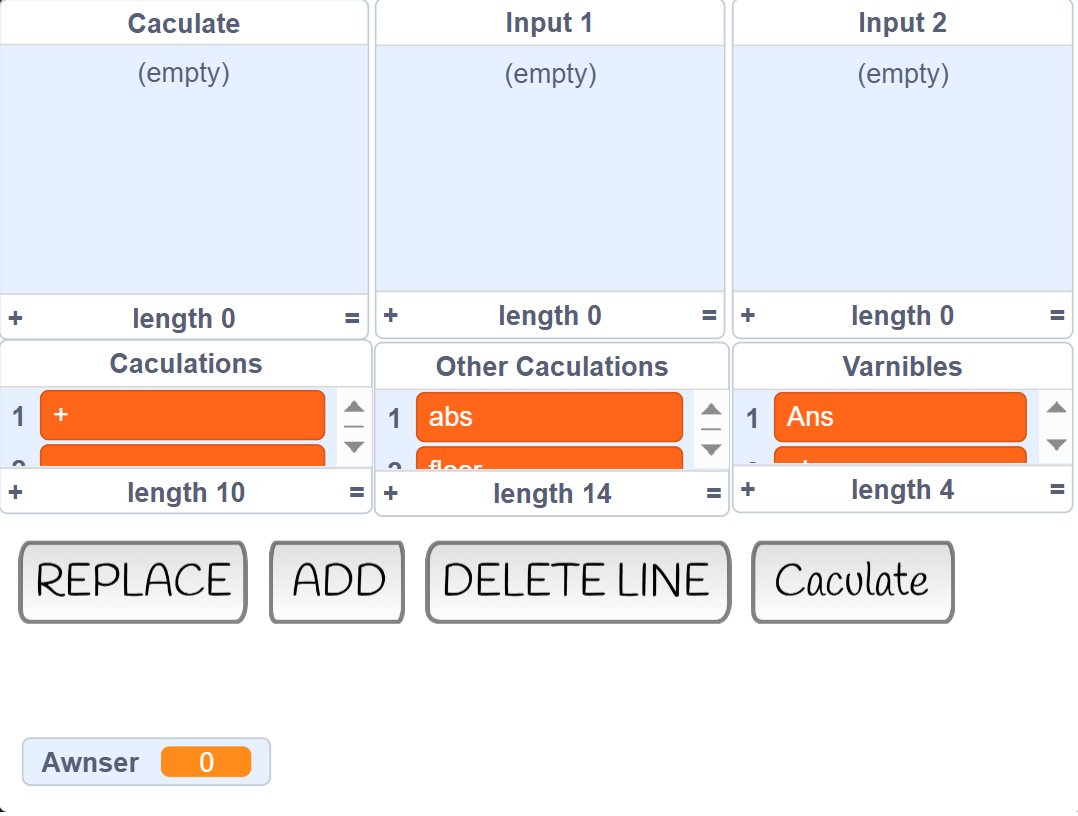
Instructions while making a caculator board in this caculator:
1. When you click on the "replace" button, you must type a number line so the system can detect which line to replace.
After that, type in what would you change for the Caculate list, then the input 1 list and input 2 list.
2. If you want to add new commands for the system to caculate, you should use the "add" button.
First, enter the type of caculation you want to use (which is from the "Caculations" and "Other Caculations" list). Next, enter the first value of the equation then finally, please enter the second value of the equation (In the beetween of those steps, please click enter on your keyboard or click on the tick button)
3. Accidently add a new equation? The "delete" button can help you. Click on the button, then type in the line you want to delete in the 3 lists
4. Can't wait for the final awnser? Click on the "caculate" button in order to get the correct awnser.
Notes:
- For math functions that only needs one value, please type in the name of the function then type in the first value and finally type in any number you want as the second value.
- "gc" in the varnible lists stands for gelfond's constant (e^pi)
Development log
- Simple Caculator Update 1.1!Feb 15, 2026
Leave a comment
Log in with itch.io to leave a comment.